Mini 4K WiFi Bluetooth Projector Setup & Buying Tips
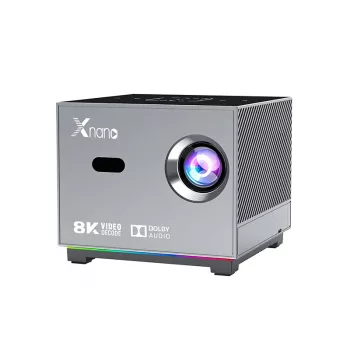
Mini 4K Portable Home Theater Projector with WiFi & Bluetooth: Big-Screen Nights in a Small Package
A compact projector can turn a bedroom wall, backyard screen, or travel setup into a full movie night without complicated wiring. This guide covers what to expect from a mini 4K-style portable projector with WiFi and Bluetooth, how to set it up for reliable streaming and audio, and which features matter most for everyday home theater use.
Who This Projector Fits Best
- Apartment or dorm setups that need a big screen without a TV stand
- Casual movie nights, kids’ rooms, and occasional gaming on a larger display
- Outdoor viewing where portability and quick setup matter
- Travel or second-room use where a compact footprint is preferred
- Buyers who want wireless audio support via Bluetooth speakers or headphones
If the goal is a flexible “set it down and press play” experience (rather than a permanently mounted theater), a mini projector is often the most convenient way to scale up the picture fast.
At-a-Glance: Key Specs to Confirm Before Buying
- Native resolution vs. supported input resolution: many mini models accept 4K input but display at a lower native resolution
- Brightness: pay attention to real-world use in dim rooms vs. daylight
- Throw distance: how far it sits from the wall/screen to get the image size you want
- Focus and keystone correction: manual vs. automatic, and how often you’ll need to adjust
- Ports: HDMI/USB/audio out for streaming sticks, consoles, and laptops
- WiFi behavior: screen mirroring vs. built-in streaming (varies by software and protocols)
- Bluetooth mode: audio out to speakers/headphones, and whether it can also act as a Bluetooth speaker
Quick Checklist for Setup Planning
| Item to Check | Why It Matters | Practical Tip |
|---|---|---|
| Room lighting | Brightness drops fast in ambient light | Plan for curtains or evening viewing for the best contrast |
| Projection surface | Wall texture affects sharpness and color | A simple projector screen improves clarity and perceived brightness |
| Distance to screen | Determines image size and sharpness | Measure from shelf/tripod to wall before placing an order |
| Audio approach | Built-in speakers are often limited | Use Bluetooth speakers or a soundbar when possible |
| Streaming method | Mirroring can be less stable than HDMI | Keep an HDMI streaming stick as a reliable fallback |
Real-World Performance Expectations
- Darker rooms look dramatically better: even a small lamp can wash out blacks and reduce contrast.
- Focus matters more than people expect: take a minute to focus using a sharp menu screen or high-contrast title card.
- Keystone is helpful, but not free: correcting a heavily tilted image can soften corners and edges, so aim for square placement first.
- Sports and action depend on the source: smooth motion often comes down to the streaming device, console settings, and frame-rate handling.
- Fan noise varies: placing the projector a little farther from seating (or slightly off to the side) can make it less noticeable.
For deeper background on what affects image quality and room setup, Projector Central’s buying guide is a solid reference: https://www.projectorcentral.com/projector_buying_guide.cfm.
WiFi and Bluetooth: What They Solve (and What They Don’t)
- WiFi is commonly used for wireless screen mirroring or connecting to a network for streaming features (capability depends on software and supported protocols).
- Bluetooth is typically most useful for sending audio to external speakers or headphones for better volume and clearer dialogue.
- Wireless can add delay: for gaming, wired HDMI and (when possible) wired audio usually reduce latency.
- If mirroring is unstable: switching to an HDMI streaming stick often provides a smoother experience than relying on phone-to-projector casting.
- Biggest “wow” upgrade is often sound: pairing a decent Bluetooth speaker can do more for movie night than small picture tweaks.
If you want to understand the standards behind your connections, these overviews are helpful: HDMI specification basics and Bluetooth technology basics.
Simple Setup for Movie Night
Care, Placement, and Longevity Tips
Product Spotlight
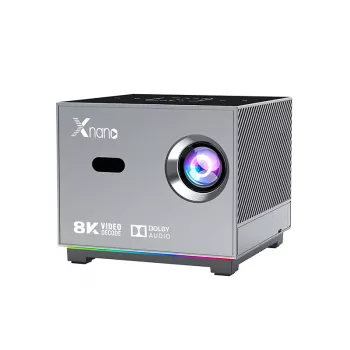
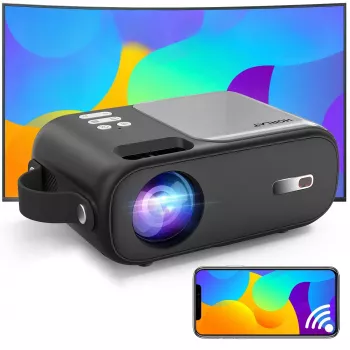
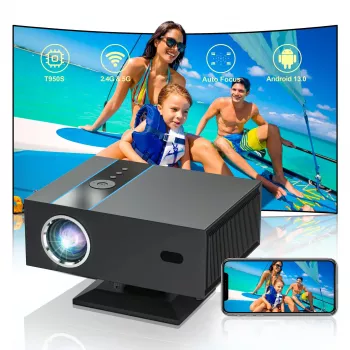
The Mini 4K Portable Home Theater Projector with WiFi & Bluetooth is built for flexible placement and quick wireless audio pairing. It’s a strong match for casual big-screen viewing in bedrooms, living rooms, and outdoor evenings—especially when paired with an HDMI streaming device and a Bluetooth speaker for more cinematic sound.
Current Listing Snapshot
| Product | Price | Availability |
|---|---|---|
| Mini 4K Portable Home Theater Projector with WiFi & Bluetooth | 101.47 USD | In stock |
Optional Add-Ons for Cozy (or Outdoor) Viewing
- Automatic Quick-Open Camping Tent with Sun Protection & Spacious Cabin for backyard movie nights that turn into an easy overnight setup.
- Women’s Color-Blocking Letter Embroidery Oversized Sweatshirt for staying warm when the temperature drops during outdoor evening screenings.
- Women’s Sheepskin Mules for comfortable indoor lounging while watching a double feature.
FAQ
Does “4K” mean the projector displays native 4K resolution?
Not always. Many mini projectors can accept a 4K input signal but use a lower native display resolution, which can still look sharp at typical viewing distances but won’t match true native 4K detail. Check the specs for “native resolution” to know what the projector actually displays.
Can Bluetooth speakers cause lip-sync delay?
Yes, Bluetooth audio can introduce latency, which may show up as voices not matching mouths. If it happens, try a different speaker, adjust audio delay settings if available, or switch to wired audio/HDMI audio routing for tighter sync.
Is WiFi screen mirroring reliable for streaming movies?
It can be, but reliability depends on your network quality, device compatibility, and the mirroring protocol being used. If you see buffering, disconnects, or quality drops, a wired HDMI connection or an HDMI streaming stick is usually the most consistent fix.













Leave a comment