Wireless Hot-Swap TKL 87-Key RGB Keyboard Guide
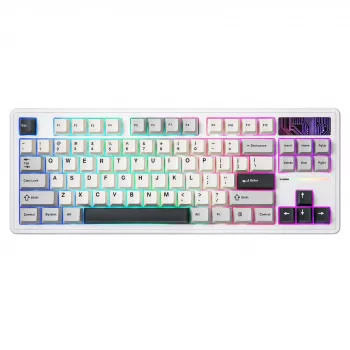
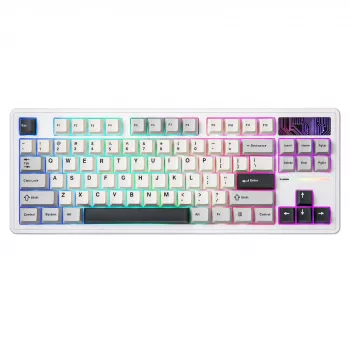
Wireless Hot-Swappable TKL 87-Key Mechanical Gaming Keyboard with RGB Backlighting
A tenkeyless mechanical keyboard can free up mouse space, reduce desk clutter, and keep inputs fast and consistent for gaming and everyday work. This guide breaks down what matters most in a wireless TKL build—switch feel, hot-swappable flexibility, wireless performance, lighting control, and long-term durability—so it’s easier to decide if Wireless Hot-Swappable TKL 87-Key Mechanical Gaming Keyboard RGB Backlit fits a specific setup.
What Makes a TKL Keyboard Practical
The tenkeyless (87-key) layout keeps the keys most people rely on—function row, arrows, and a navigation cluster—while removing the number pad for a smaller footprint. That change often matters more than expected: it creates noticeably more room for mouse movement, which can improve comfort for low-sensitivity FPS play and for smaller desks where the mouse pad competes with everything else.
Another advantage is positioning. Without a numpad forcing the alphanumeric keys left, the board can sit more centered with the monitor while keeping the mouse closer to shoulder width. For many users, that reduces the “reaching” feeling that happens with full-size keyboards. It’s also a practical middle ground between full-size boards and ultra-compact layouts that drop navigation keys and require more layers or shortcuts.
Wireless Performance for Gaming and Daily Use
Wireless is convenient, but the experience depends on stability and predictability. For gaming, the biggest quality-of-life factor is consistent connectivity and reliable wake behavior—no one wants the first keypress after idle to vanish. Receiver placement also matters; crowded wireless environments can introduce interference, and even a small reposition (or using a short USB extension) can help keep the signal clean.
Battery life varies widely based on backlight brightness and animation complexity. If runtime is a priority, setting a static color, lowering brightness, and shortening effect duration typically makes a bigger difference than most people expect. Charging-and-playing is also worth prioritizing for long sessions—having a secure port fit and easy cable routing means the keyboard can stay in the setup even during a top-up.
Wireless Setup Checklist
| What to check | Why it matters | Quick tip |
|---|---|---|
| Receiver placement | Reduces interference and dropouts | Use a short extension to keep the receiver closer to the keyboard |
| Sleep and wake timing | Prevents delayed first keypress | Adjust idle timeout if available |
| Backlight settings | Major driver of battery drain | Lower brightness or use static lighting |
| Charging behavior | Avoids downtime | Keep a cable at the desk for quick top-ups |
For readers who like digging into the standards behind device communication, the USB Human Interface Device (HID) Class Specification and the Bluetooth Core Specification outline how input devices are defined and how wireless connections are standardized.
Hot-Swappable Switches: Custom Feel Without Soldering
Hot-swap sockets are one of the most practical “upgrade paths” a keyboard can offer. Instead of committing to a single switch type for years (or learning to solder), switches can be removed and replaced as preferences change—whether that’s chasing a quieter sound profile, a lighter actuation for gaming, or a more tactile bump for typing.
Switch choice affects both speed and comfort. Linear switches are smooth and consistent, tactile switches add feedback to help avoid bottoming out, and clicky switches provide audible confirmation (popular for some typists, less ideal for shared spaces). Hot-swap also makes mix-and-match setups realistic: lighter switches for WASD and quick actions, slightly heavier ones for modifiers to reduce accidental presses during tense moments. Before buying extras, it’s still smart to check compatibility expectations—most commonly pin style and stem type—so installation is clean and the switches seat properly.
RGB Backlighting That’s Useful, Not Just Flashy
RGB can be more than decoration when it’s configurable. Per-key or zone lighting improves visibility in low light, and subtle effects can keep the board readable without pulling attention away from the screen. A practical approach is to use profiles: one for gaming (highlighting movement keys, abilities, or push-to-talk) and one for work (neutral white or a warm tone for long sessions).
Build Quality and Comfort Details to Look For
Everyday Workflow: Navigation, Shortcuts, and Productivity
Quick Specs Snapshot
| Detail | Value |
|---|---|
| Product | Wireless Hot-Swappable TKL 87-Key Mechanical Gaming Keyboard RGB Backlit |
| Layout | TKL (87 keys) |
| Core features | Wireless, hot-swappable switches, RGB backlighting |
| Availability | In stock |
| Price | $114.01 USD |
Who This Keyboard Suits Best
In-Stock Picks to Round Out a Cozy Setup
- Wireless Hot-Swappable TKL 87-Key Mechanical Gaming Keyboard RGB Backlit — a compact mechanical layout with wireless freedom and switch-swapping flexibility.
- Women’s Color-Blocking Letter Embroidery Oversized Sweatshirt — a relaxed layer for cool rooms and late-night sessions.
- Women’s Sheepskin Mules — soft indoor footwear for home offices and gaming corners.
FAQ
What does hot-swappable mean on a mechanical keyboard?
Hot-swappable means the keyboard’s switches can be removed and replaced without soldering, making it easy to change how the keys feel and sound. Compatibility still matters, so it’s important to use switches that match the socket type and to insert them carefully to avoid bending pins.
Is a wireless mechanical keyboard good for gaming?
Yes, as long as the connection is stable and wake behavior is consistent, wireless can work well for gaming. Keeping the receiver close, minimizing interference, and using reasonable lighting settings can help maintain reliable performance and battery life.
Why choose a TKL (87-key) layout instead of full-size?
TKL removes the number pad to free up desk space and often improves mouse positioning, which can feel more ergonomic for many setups. If a numpad is only needed occasionally, adding a separate numpad later keeps the main desk area compact.









Leave a comment