4-Channel RGB XLR Audio Mixer for Streaming & Podcasts
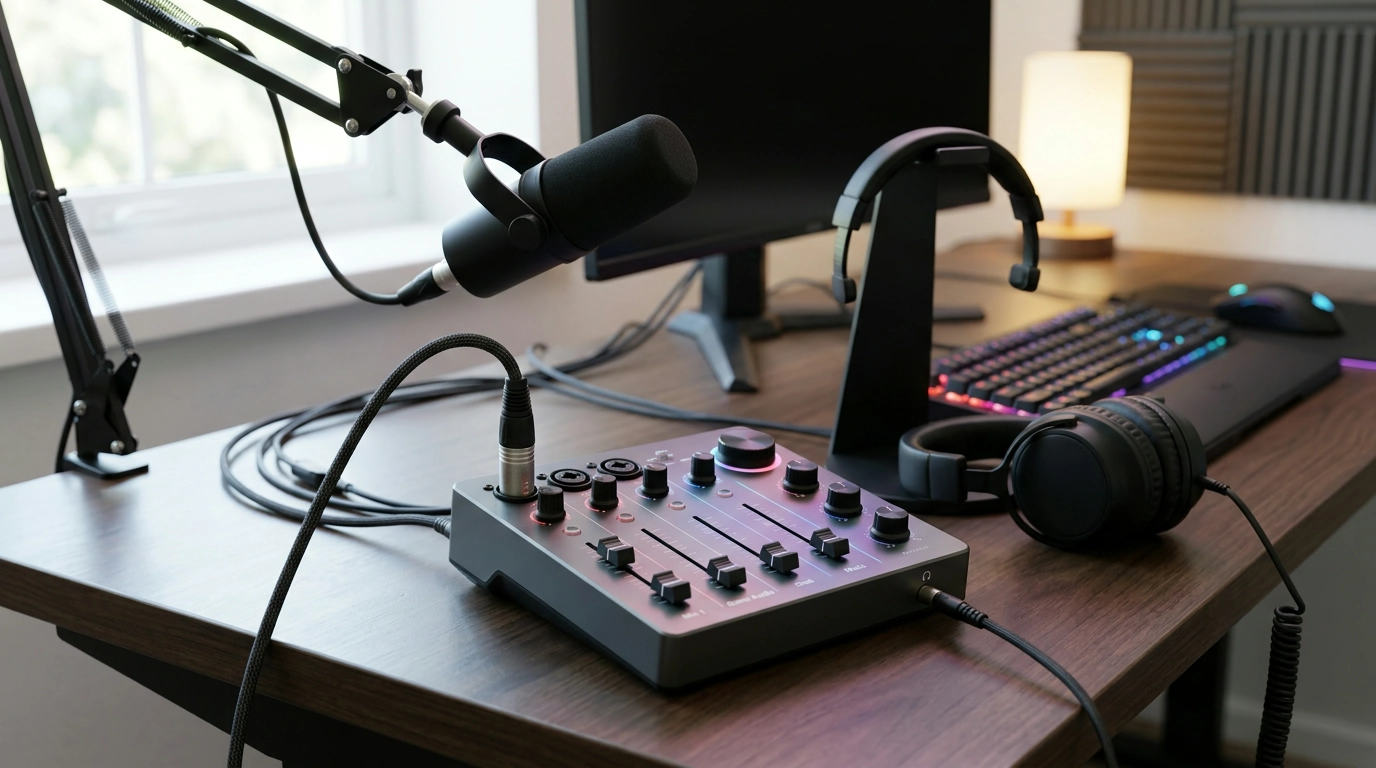
RGB Audio Mixer with XLR Interface: A 4-Channel Control Center for Streaming, Gaming, and Podcasts
An RGB audio mixer with an XLR interface can simplify live audio by keeping mic, game, music, and chat levels on dedicated controls. Instead of hunting through software sliders mid-match or mid-sentence, a compact 4-channel desktop mixer is designed to put your most important sources on physical knobs or faders—so you can react in real time and keep your sound consistent from stream to stream. For more guidance, see OneOdio Solocaster | Headphone Reviews and Discussion – Head-Fi.
What This 4-Channel RGB Audio Mixer Is Built For
- Centralizing multiple audio sources so levels can be adjusted live without switching windows or menus.
- Using an XLR microphone input for dependable connections and the option to run a wide range of pro-style mics.
- Maintaining a repeatable “show sound” for livestreams, party chat, and podcast sessions with quick-access controls.
- Adding visual feedback and desk aesthetics with RGB lighting while keeping everything reachable during gameplay.
Typical Sources You Can Run Through 4 Channels
A four-channel layout is popular because it matches how most creator setups naturally break down: one channel for voice, one for game audio, one for chat, and one for music/alerts or a secondary device. The exact inputs depend on the mixer’s design (USB, line-in, or dedicated returns), but the planning logic stays the same—separate what you need to adjust independently. For further reading, see FIFINE AmpliGame SC3 Audio Mixer Review – ThinkComputers.org.
Channel Planning Worksheet (Example)
| Channel | Source | Goal | Quick Tip |
|---|---|---|---|
| 1 | XLR Microphone | Clear voice with stable level | Set gain so loud speech peaks without clipping; keep a little headroom |
| 2 | Game/Console Audio | Immersive but not overpowering | Start lower than voice; raise only until it feels full under speech |
| 3 | Chat/Discord | Teammates audible but controlled | Use a dedicated knob/fader to pull chat down during intense moments |
| 4 | Music/Alerts | Energy without masking speech | Duck music manually during talking points or use software ducking if preferred |
XLR Basics That Matter for Streaming and Podcasts
- Secure, low-noise connections: XLR cables are built to lock in and resist interference better than many consumer connectors—helpful on a desk with keyboards, chargers, and capture gear.
- Mic type changes what you need: Dynamic microphones usually need more gain, while condensers may require phantom power (make sure the mixer supports it if you plan to use a condenser).
- Gain staging keeps your voice clean: Set input gain first (so the microphone signal is strong but not distorted), then use channel level controls to blend everything together. For a practical overview of recording levels, RØDE’s guide to gain staging is a solid reference: https://rode.com/en/learn/recording/gain-staging.
Mic placement matters as much as gear choice. If your voice sounds distant or roomy, moving the mic closer often helps more than turning the gain up. For general positioning techniques, see Shure’s microphone technique tips: https://www.shure.com/en-US/performance-production/louder/microphone-techniques.
Fast Setup: From Desk to Live Sound
- Connect the XLR mic and position it well: Aim for roughly 4–8 inches from your mouth (adjust for plosives and comfort). A closer mic usually means less room echo and a more “present” voice.
- Feed in game/PC/console audio: Use the mixer’s supported path (USB and/or line-in). Keep the routing simple at first—one input per source—then refine once everything is stable.
- Monitor with headphones: Headphone monitoring lets you catch hum, clipping, and odd balance changes before your viewers do.
- Build your baseline mix: Set voice first, then bring game audio up underneath, then chat, then music/alerts last.
- Do a quick test: A 30-second test recording or private stream is usually enough to confirm levels and spot buzz, latency, or sudden distortion.
Getting a Clean Mix: Practical Level Targets
If you’re still dialing in microphone fundamentals (types, pickup patterns, and common usage), Audio-Technica’s microphone basics overview is a helpful refresher: https://www.audio-technica.com/en-us/support/audio-solutions-question-of-the-week-microphone-basics.
RGB Lighting: Useful Signals (Not Just Looks)
Who This Mixer Fits Best
Product Snapshot: RGB Audio Mixer for Streaming, Gaming & Podcasts (4-Channel, XLR Interface)
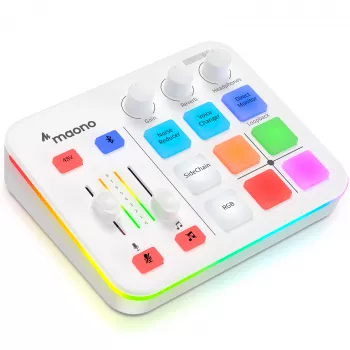
If you’re looking for a straightforward desktop control surface that matches the common four-source streaming layout, check out the RGB Audio Mixer for Streaming, Gaming & Podcasts with XLR Interface, 4-Channel. It’s designed to manage multiple inputs with real-time controls and an RGB-forward look that fits into a creator desk setup.
More In-Stock Picks
FAQ
Does an XLR input automatically mean better audio than USB?
No—XLR mainly gives you access to many professional microphones and secure balanced cabling. Final quality depends on the microphone, the mixer’s preamp and gain settings, your mic placement, and the acoustics of your room.
Can a 4-channel mixer handle game audio, voice chat, and music at the same time?
Yes, as long as the mixer provides the inputs and routing you need for those sources. A common setup is mic on Channel 1, game audio on Channel 2, chat on Channel 3, and music/alerts on Channel 4, though some systems still use software routing to separate chat cleanly.
How do loudness and clipping get fixed quickly during a live stream?
If you’re clipping, reduce input gain first, then fine-tune the channel level so the mix stays balanced. Monitoring with headphones and doing a short test recording helps confirm your peaks before you go fully live.













Leave a comment